How-to guide · Core capabilities Read the orb

Surfaceorb states
Audience Vision Cognitive
Time Read once, recognize forever
Permissions None
What this is: The big circle in the center of Aside’s screen is called the orb. It is the entire UI, on purpose. Its color and motion tell you what Aside is doing right now — idle (waiting), listening (mic open), thinking (working), speaking (replying aloud), or error (something went wrong). A small mono pill at the top of the screen says the same word in plain text for anyone who prefers to read state instead of feel it.
Try it now

Open Aside. The orb is in idle. Tap the orb or type a question, and watch it move through listening, thinking, speaking, then back to idle. The status pill at the top of the screen always shows the same word the orb is showing.

“What’s the weather?”

That one phrase will walk the orb through every healthy state in about 8 seconds.

The four healthy states

  1. Idle — waiting for you

    The orb is calm and slowly breathing — a soft warm-paper color with a gentle brown core. The pill at the top reads • IDLE. Below the orb you see “Tell me everything,” with the hint “Tap the orb or type below.”

    What it means: Aside is open, ready, and not doing anything. The microphone is off. Nothing is being sent anywhere.
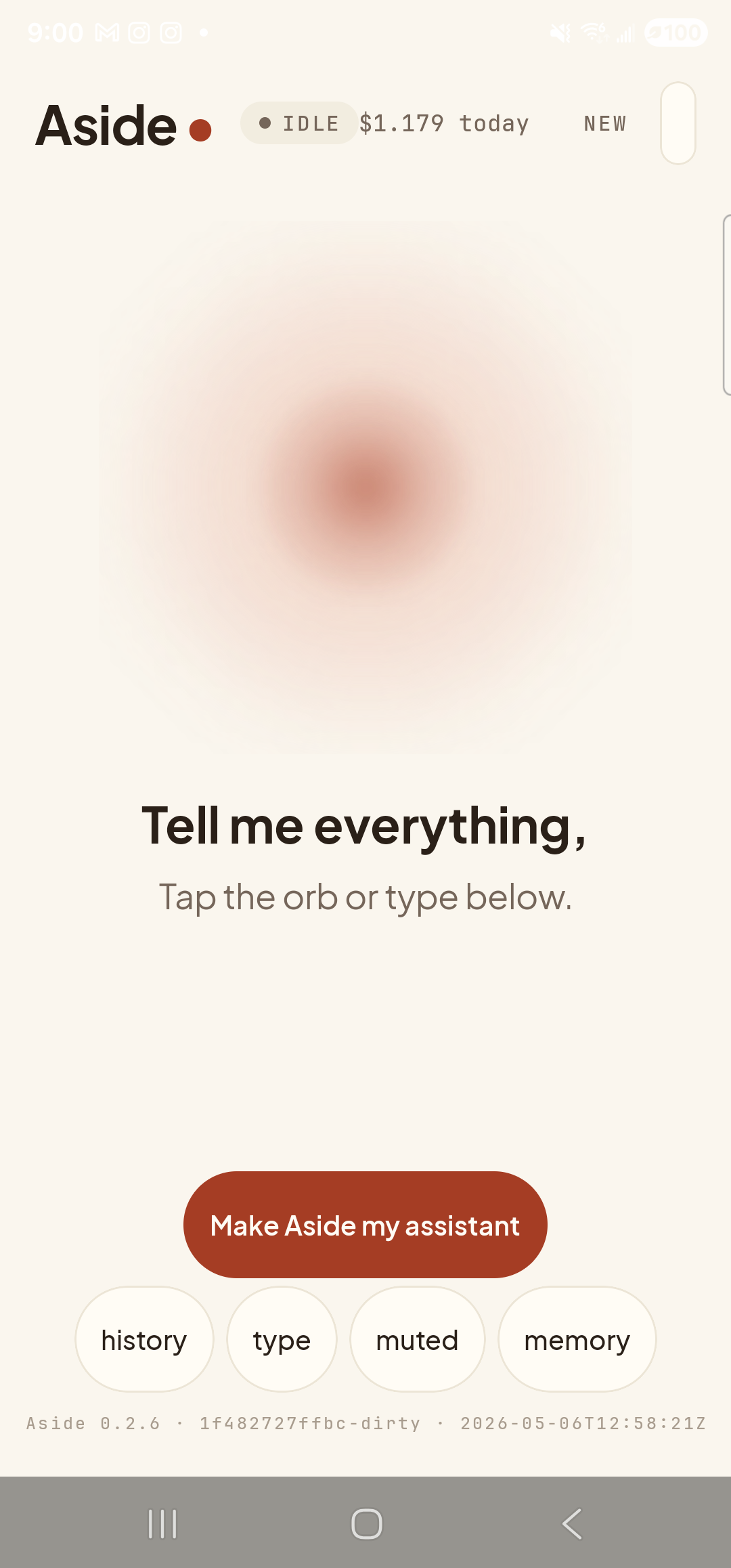
    The Aside main screen at idle on a Samsung Galaxy S23 Ultra. Across the top: the word ‘Aside’ with a red dot, a small mono status pill reading ‘● IDLE’, the cost counter ‘$1.179 today’, and a ‘NEW’ link top-right. Centered in the screen is a large warm-paper-colored orb with a soft brown core, almost still. Below the orb, in large bold type: ‘Tell me everything,’. Below that, in lighter type: ‘Tap the orb or type below.’. Near the bottom is a clay-colored pill button reading ‘Make Aside my assistant’. Below that is a row of four mono pills: ‘history’, ‘type’, ‘muted’, ‘memory’. The very bottom shows the build-identity line ‘Aside 0.2.6 · 1f482727ffbc-dirty · 2026-05-06T12:58:21Z’.
    Idle: orb is breathing slowly, status pill says • IDLE. Mic is off.
  2. Listening — mic is open

    The orb is the same warm shape but slightly larger and outlined with a soft halo that moves with the loudness of the room. The pill at the top reads • LISTENING…. The caption beneath the orb changes to “I’m listening.”

    What it means: The microphone is open and your voice is being transcribed. This is the only state in which Aside is recording you. As soon as you stop speaking (or tap the orb again), it leaves listening.

    What’s the weather?
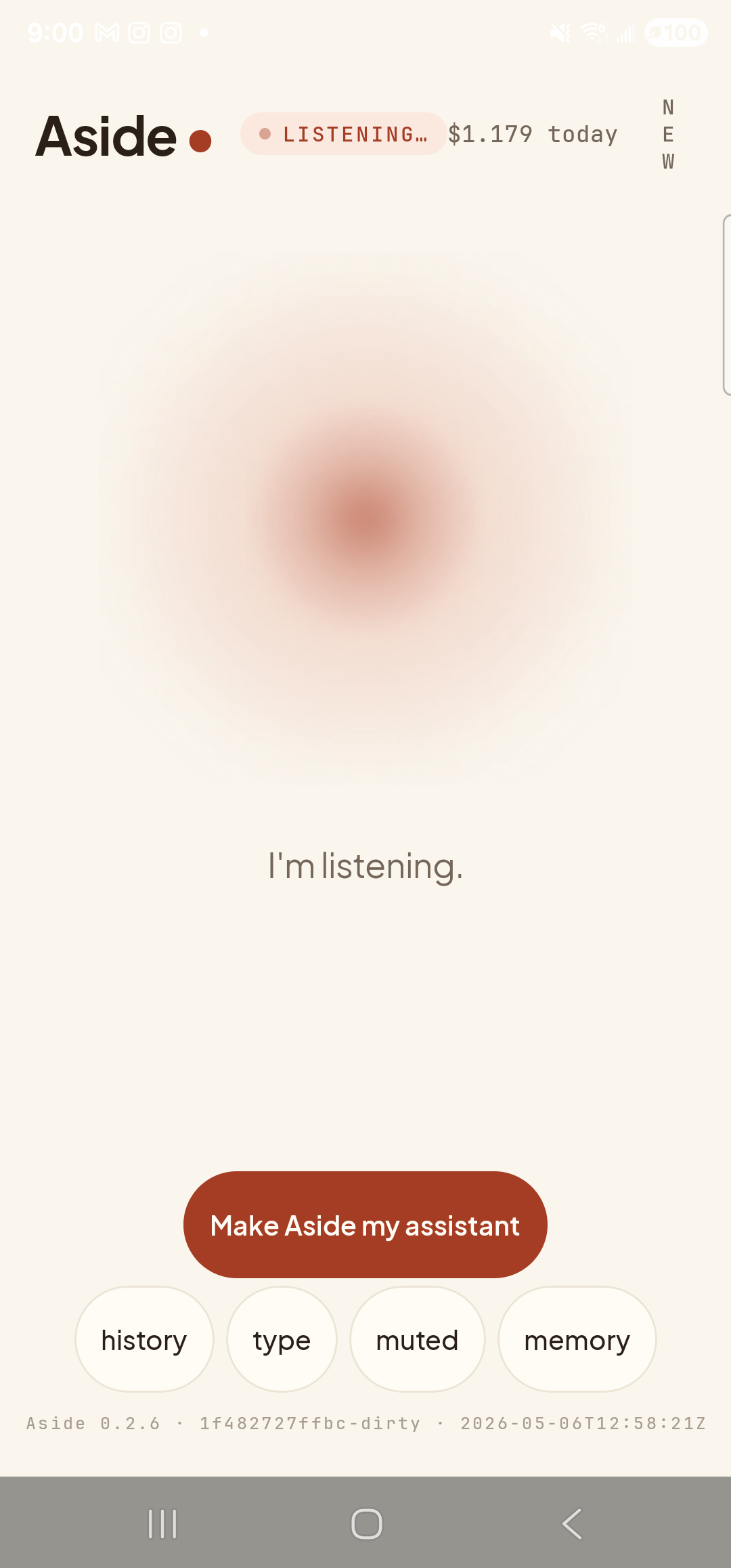
    The Aside main screen now in the listening state. The status pill at the top has changed to ‘● LISTENING…’. The orb is the same warm shape, ringed by a soft dotted halo that moves with mic level. Beneath the orb, replacing the earlier two-line prompt, a single sentence reads ‘I’m listening.’. The ‘Make Aside my assistant’ button and the bottom pill row (history / type / muted / memory) and build stamp are unchanged.
    Listening: halo grows and shrinks with your voice. Pill reads • LISTENING…
  3. Thinking — working on the answer

    The orb settles into a steady, slightly faster pulse and the core deepens. The pill at the top reads • THINKING. The caption beneath the orb says “Thinking…”

    What it means: Your request has been sent to Aside’s server and the model is composing a reply. The mic is closed again. This window is usually 1–3 seconds; longer for complicated questions.
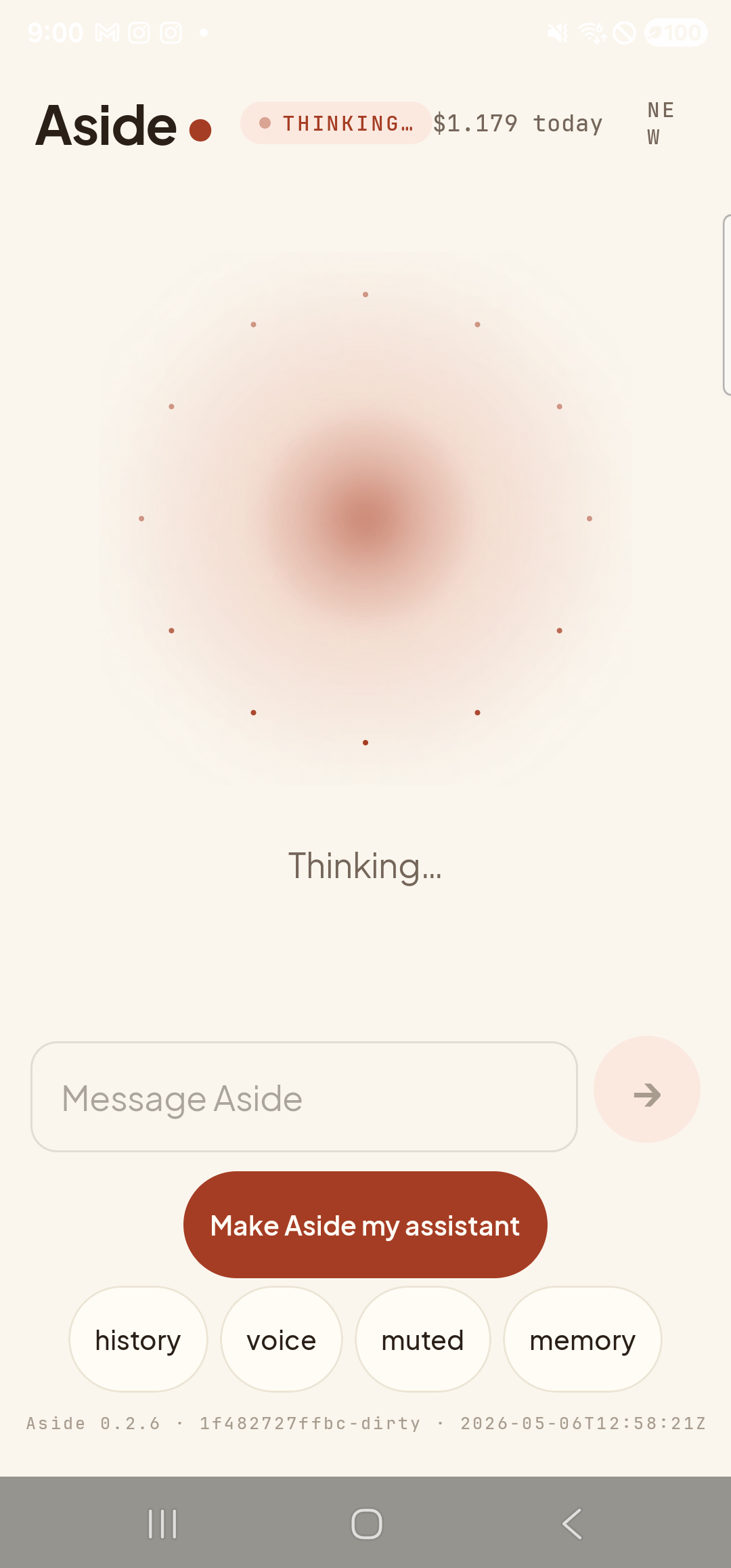
    The Aside main screen in the thinking state, captured during a typed turn. The status pill at the top reads ‘● THINKING…’. The orb has a deeper core with eight small dots radiating outward in a steady ring — the visual indicator that work is in flight. The caption beneath the orb reads ‘Thinking…’. The ‘Message Aside’ text input is visible (now empty) with a faint send-arrow button to its right. Below that the bottom pill row reads ‘history / voice / muted / memory’ — the ‘type’ pill has become ‘voice’ now that text-input mode is active.
    Thinking: deeper core, dots radiating outward. Pill reads • THINKING….
  4. Speaking — reading the reply aloud

    The moment the first sentence arrives, the orb shifts into speaking — a relaxed wave that rides the syllables — and audio starts coming out of the speaker. The pill at the top briefly reads • SPEAKING. On most short replies this state passes through in well under a second; you’ll hear the audio before you see the pill change. Tap the orb at any time to interrupt and ask a follow-up.

    What it means: Aside is reading its reply aloud through your phone’s speaker. Audio starts at the first sentence boundary, so the orb is already speaking before the full answer has even arrived.

The error state

When something goes wrong — no network, server saturated, microphone permission revoked — the orb keeps the same shape but the pill at the top turns into a red • ERROR, and a banner appears under the orb explaining what happened in plain language (for example, “Couldn’t reach Aside — check your internet,” or “Saturated — please try again in a moment.”). Tap the orb to dismiss the banner and try again, or tap the NEW link at top-right to start a fresh session.
Reduce-motion respected: If you have reduce motion turned on at the system level (or in Aside’s Accessibility settings), the orb stops breathing entirely. The color shift between states is preserved — the state is still readable; the motion just stops.
If the orb looks frozen: That usually means the system has paused animations system-wide (Developer Options » Window animation scale set to 0). Aside follows that setting deliberately. Re-enable animations system-wide, or rely on the status pill at the top of the screen for state — that text is always live.